Mealglance guides
How to count calories from a photo
Mealglance team · Updated 29 October 2026 · 5 min read
A meal photo can help you start a food record while the plate is still in front of you. You do not have to search for every ingredient before you begin. But a picture cannot tell the whole story of a meal, so the useful part is checking what comes back.
This guide explains how to count calories from a photo, where the guesswork happens and what you can do to make the record more useful. It is general information for adults aged 18 and older, not medical advice.
How a photo estimate works
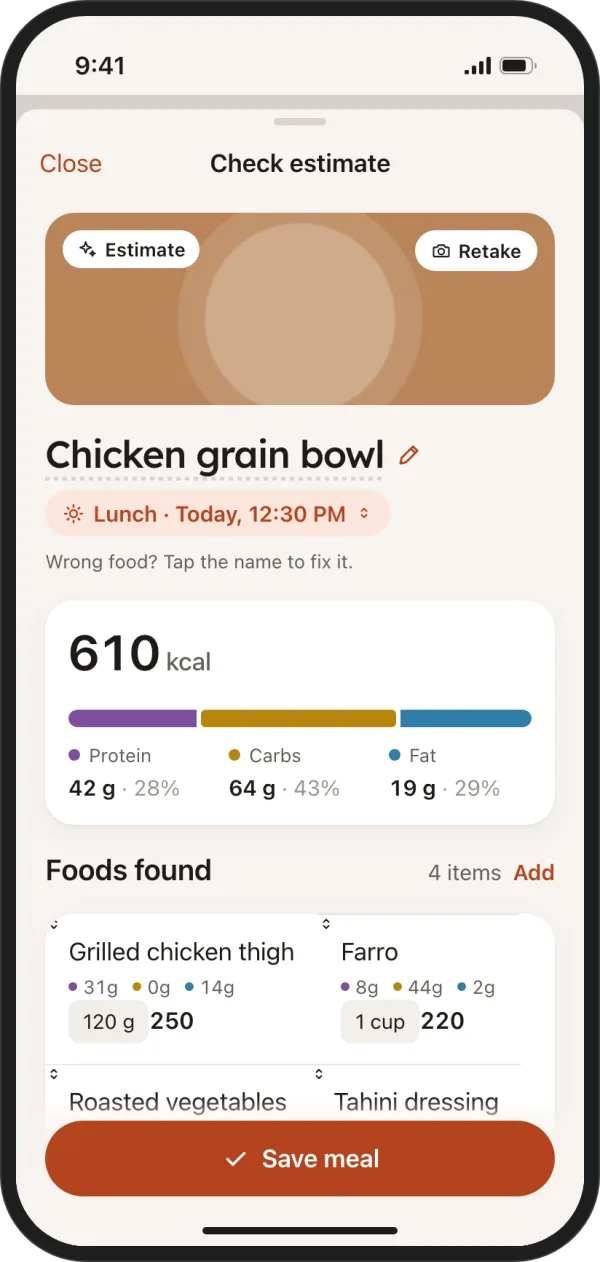
An AI service looks at your photo and names the foods it can recognize. It estimates each portion in grams and the nutrition per 100 g. The app then multiplies those values by the estimated portion and adds up the calories, protein, carbs and fat for the meal.
That process involves several guesses. A food might look like a similar dish with different ingredients, and a deep bowl might hold more than it seems. The result is an estimate to check, not a measurement. You can use the check screen to bring it closer to what you actually ate.
What a photo can and cannot show
A photo shows the visible surface of your meal. It can help identify rice, vegetables or pieces of chicken on top of a plate. It cannot show everything underneath them, or tell you how the food was prepared before it reached the table.
Details that can be missing include:
- Cooking oil or butter absorbed during cooking.
- Dressing mixed into a salad or sauce stirred through a dish.
- Sugar in drinks, or the milk used in a coffee.
- The fat level of minced meat.
- Food hidden under another food.
Portion size is especially hard without a reference object. A small plate close to the camera can look like a large plate farther away. A familiar object helps with scale, but it still does not turn the photo into a set of kitchen scales.
How to take a photo that gives a better estimate
You do not need a carefully arranged food photo. Aim for a clear view of what you are about to eat, with enough context to judge the portion.
- Use good light so food shapes and edges are visible.
- Shoot from about 45° or from above, choosing the view that shows the food clearly.
- Keep the whole plate in the frame, including its edges.
- Use one plate per photo so portions are easier to separate.
- Keep cutlery or a hand in view as a size reference.
- Take the photo before you eat, while the portion is still complete.
- Keep sauces separate where you can, so you can describe them more easily.
If the first picture hides part of the meal, change the angle before you send it. A clear view is more useful than a decorative background or a close crop.
Add what the photo misses
A short note can supply details that no camera can see. You might write “cooked in 1 tbsp olive oil” or “large latte with oat milk”. Describe what you know rather than trying to guess every hidden ingredient in a restaurant meal.
On the check screen, read each food name and its portion in grams. Does the list include your drink and sauce? Does the rice portion look plausible? Change anything that looks off before you save. If you know a weight from the kitchen, you can use that instead of the estimated grams.
When to use another way
A photo is one way to record food. Choose the method that gives you the clearest information for the meal in front of you:
- Packaged food: scan the barcode to use the label values, then check the serving you ate.
- A mixed dish you make often: save it to My meals so you can use it again without starting from a new photo.
- Food you cannot photograph: describe it in words or type the nutrition numbers you already have.
You can use different methods throughout the day. A barcode for a snack and a photo for dinner can both belong in the same record. The aim is to make recording practical enough to keep doing.
How accurate is it?
Photo estimates can be off, especially when oils, sauces and portion size are unclear. Recognizing the food does not mean the app knows the exact recipe. A meal that looks simple can still have ingredients you cannot see, so there is no reason to treat the first result as exact.
The value is a consistent daily record and the trend over weeks. Those patterns matter more than a perfect single meal. Check the obvious gaps, use the information you have and review your record over time. Food values are information you can use, not scores for how you ate.
Privacy
In Mealglance, your photo is re-encoded without location and camera details. It is sent to an AI service for analysis only after you agree, is limited to 4 MiB and is not kept after the estimate.
Before you photograph a meal, check the frame for anything you do not want to include. You can also use a text description instead. Read the privacy policy for more about how Mealglance handles your information.